

Time is running out to complete the Cybersecurity Awareness Month Scavenger Hunt! Don’t miss your chance to win a prize like a Sony Bluetooth speaker or other “engaging” prizes. Each level you complete gives you another chance to win and if you complete them all and submit your name (and maybe a comment?) on the last page, you will be eligible for the drawing for the Sony speaker.
You also only have a few more days to complete your Fall 2025 Cybersecurity Awareness Training! Jump on that if you haven’t already. Students, remember, you will eligible for a drawing for a prize if you complete the training by noon on Friday, October 31st. Over 300 of you have completed it so far! Great going! Faculty and staff, reminders will be going out to both you and to your supervisor to complete the training. We’re halfway there, faculty and staff! Let’s get it done!
We have one final topic this last week of Cybersecurity Awareness Month. We’re talking about spotting phishing emails and scams and how to report them. After I explain the process to report phishing emails and where to report other types of scams, Gabby, my student worker has a “Halloween-ized” section on how to spot those “scary” phishing emails and also explains spear phishing.
If you receive a phishing email that manages to slip through all of the defenses we throw against them, you can and should report it to us. If you are using Outlook, the Outlook Web Interface at https://mail.berry.edu, or the mobile Outlook app, it is easy to report a phishing email. For Outlook, just click on the “Report” drop-down menu on your ribbon bar, then “Report Phishing”. You can also report Junk the same way, just click “Report Junk” from that same menu. If you are on the Outlook Web Interface at https://mail.berry.edu, just go to the “three dots” menu on the right side of the page, click on “Report”, then “Report Phishing” or “Report Junk”. It’s the same for the Outlook mobile app…go to the “three dots” menu, “Report”, then “Report Phishing” or “Report Junk”.
If you are using any other method to read your Berry email, you must start a new email to “phishreport@berry.edu” and attach the phishing email to it. Don’t simply forward it to that address…if you forward it, we lose any information about where it might have come from. If you attach it, it preserves that information for us and we can make better use of the reported email.
For other types of scams, like text messages, or direct messages in social media platforms, you should first file a report with your wireless carrier or with the website you are using. In the case of text messages, you should report them as junk using the tools on your phone. Different social media sites have different ways to report junk and abuse – you will need to find out how your chosen platform works. Once you know how, report as many scams and junk messages as you can. This helps the platform remove or sanction them.
In the case of other fraud or scams, you should go to the Internet Crime Complaint Center at ic3.gov and file a report there. They will walk you through the process once you click the “File A Complaint” button on the site. Pay attention to the information on the main page…all crimes or fraud against children are reported elsewhere and reports of terrorism should be sent to the FBI. Here’s hoping none of you have to deal with any circumstances that warrant a report to either of those agencies.
Here’s Gabby’s work on phishing and spear phishing. Enjoy!
Happy CAM week 4! As we approach the end of CAM, and Halloween, the spirit of trick or treating is in the air. I would like to talk about one of the worst kinds of tricks to put on this holiday: phishing. Phishing is a form of cyberattack in which phishers (the attacker) send emails, text messages, or website links in an attempt to gain money, or private information. Spear phishing is a specific type of phishing aimed toward specific groups or organizations, and attackers can pose as someone you know and trust.
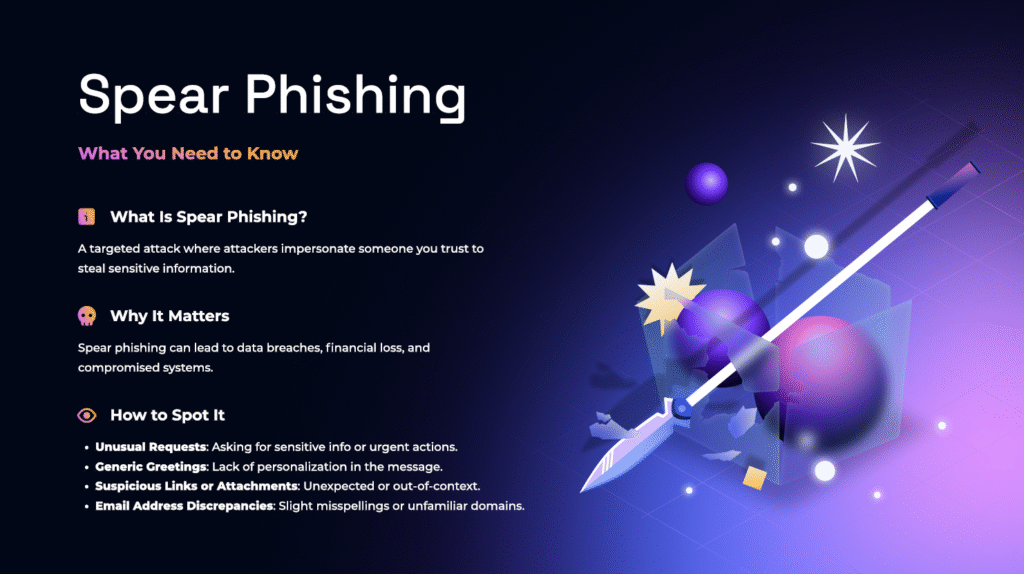
Attached below is a short video about phishing, as well as protective measures against these attacks.
- Bad grammar or spelling (including use of the uncommon word “kindly” instead of “please”)
- Sense of urgency, examples include: “URGENT”, “Pending Charge”, and “Outstanding Amount Due”
- Request for money, gift cards, or sensitive information like passwords, addresses, bank account numbers and so on
- Odd sender addresses, examples include: “hsehBheJEfn@gmail.com”, “helloDOlly+mfAjdje@gmail.com”
- Sender address does not match the sender name/title
- Some phishing emails come in the form of unknown Google classroom links
- Unlikely ruses like romantic interests from complete strangers
- NEVER click on links that you are unsure of
- Always read the sender address and domain carefully
- Search for bad grammar and out of place words
- Be careful when taking calls from an unknown number and never give away sensitive information if you are unsure of the credibility of the person you are giving information to
- Sometimes attackers can pose as a loved one using AI to generate a voice, and to avoid impersonation, you can come up with a code word that both parties would know, to stay away from potential scams and swindles
Happy Halloween from the InfoSec team and stay safe!
Want to check if your email has been compromised?
Have I Been Pwned: Check if your email address has been exposed in a data breach
Check for potential malicious links
Thanks for reading! Get that cybersecurity awareness training completed and since Halloween is coming, take a STAB at the scavenger hunt! We’ll be back with even more content in November.


 NCSAM Week 5 – IoT, MFA, and PhysSec
 CAM Week 2 – MFA and Securing Devices
How much damage has spear-phishing done to date? Are there any public/high-profile case studies that we could look at and say “Oh, that could have easily happened to me or at my organization.”
Unfortunately, the damage done by spear-phishing is not always apparent, as it is many times not recognized or classified as such. One high profile (at least in information security circuits) successful spear-phishing event (and it may not have been exactly spear-phishing, but all indications say it was) was the successful phishing of the creator of Have I Been Pwned – Troy Hunt. He was successfully phished though his MailChimp account and even has a full write-up on it on his site – troyhunt.com Once you are there, look for the blog post title of “A Sneaky Phish Just Grabbed my Mailchimp Mailing List”. It is several pages back in his blog posts, but worth the read. He doesn’t have a search function on the sight that I could find.